
Choose who qualifies
Target named learners, courses, groups, lessons, topics and quizzes.
Automate LearnDash course enrollment and quiz follow-up emails with rules you control. Choose the learner event, narrow the audience and set the next action. Pro adds group workflows, webhooks and dry-run previews.

Move learners forward without repeating the same admin tasks. Connect a quiz result, course completion or access change to a useful next step. Start free, then add Pro for advanced workflows.
Target named learners, courses, groups, lessons, topics and quizzes.
Check conditions and run ordered actions when the event matches.
Save drafts, inspect activity and use licensed Pro dry-run previews.
Name the rule and choose the moment that should start it. Core LearnDash completion and course-access triggers are included free. Pro adds account, group, scheduled and registered developer events.
Explore the guide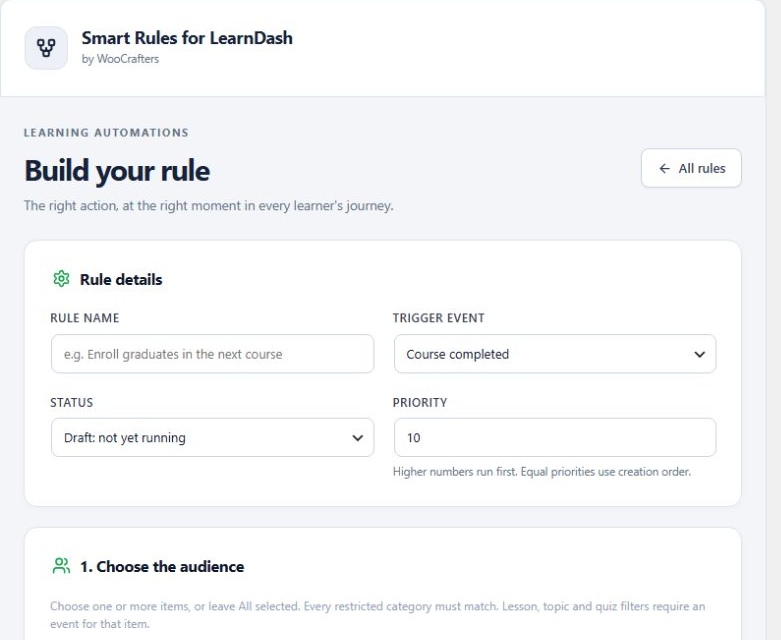
Search by title instead of copying IDs. Select one quiz, several courses or an entire group. Leave All selected when a category should have no restriction.
Explore the guide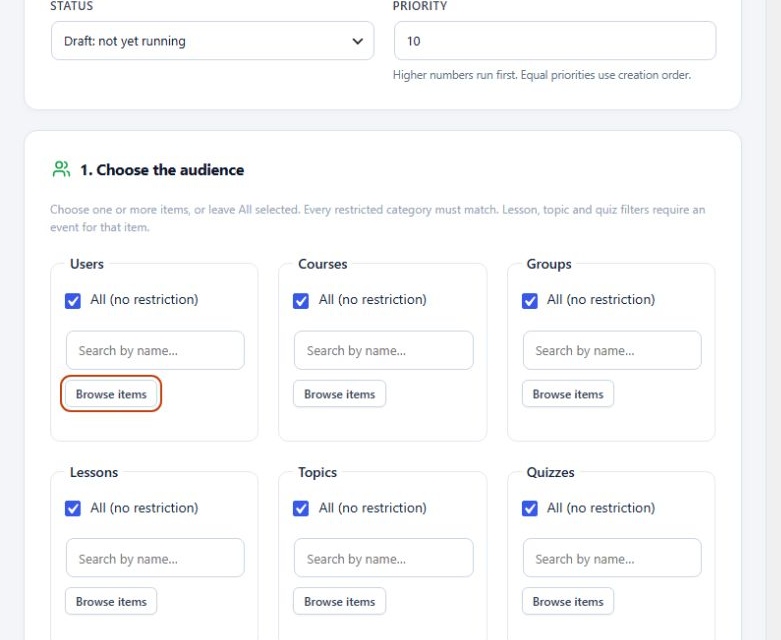
Combine checks with AND or OR. Use quiz scores, course progress, membership, roles and metadata to decide which learners qualify. This example requires a quiz score of at least 80 percent.
Explore the guide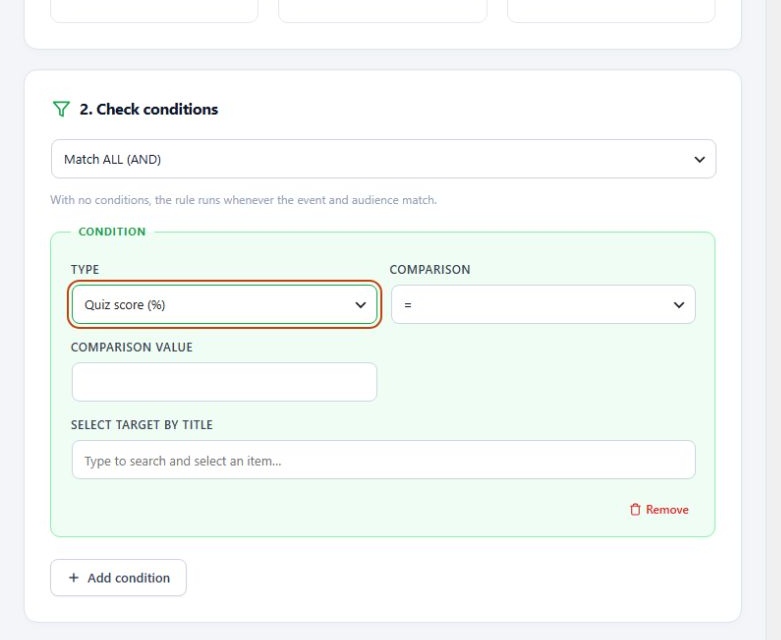
Enroll a qualifying learner in the next course and send a clear follow-up email with the free plugin. Pro adds group and role changes, administrator emails, HTTPS webhooks and registered developer actions.
See the quiz-to-course automation example.
Explore the guide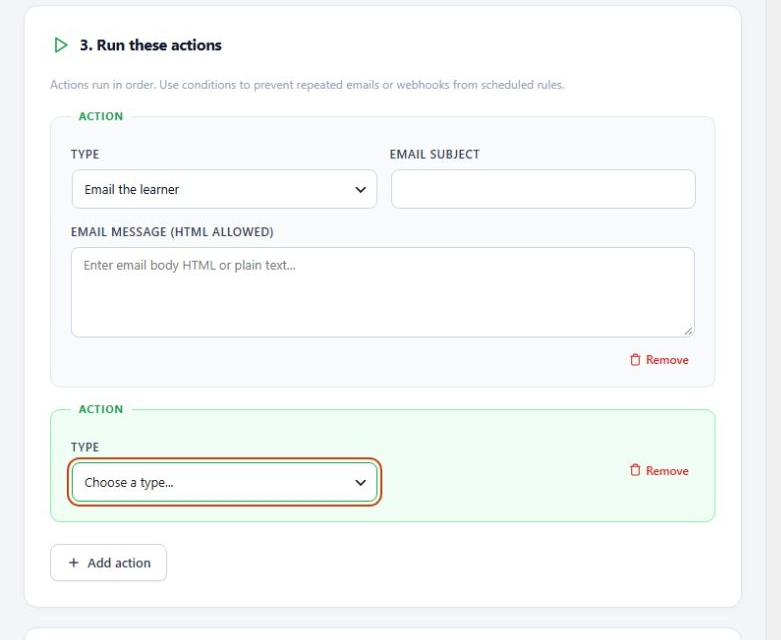
Keep a rule in Draft while preparing it. Licensed Pro dry-run evaluates supported actions without applying them. Review execution activity before enabling live changes.
Explore the guide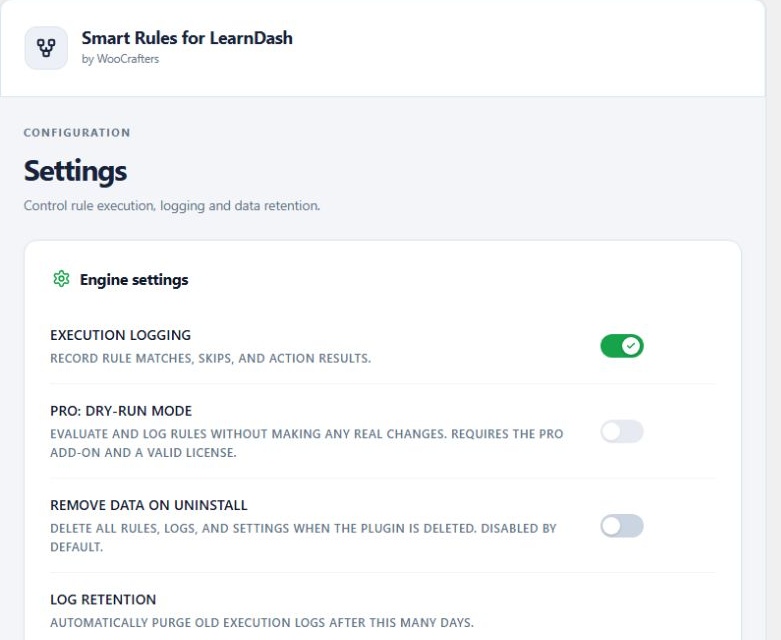
Smart Rules for LearnDash Pro
$120.00
1-year license
Smart Rules for LearnDash Pro
$150.00
1-year license
Smart Rules for LearnDash Pro
$250.00
1-year license
Smart Rules for LearnDash Pro
$200.00
One-time payment
Smart Rules for LearnDash Pro
$400.00
One-time payment
Smart Rules for LearnDash Pro
$600.00
One-time payment
Free. No license key needed.
Build core LearnDash automations with audience filters, conditions, course enrollment and learner emails.
Sign in to download instantly. No order, checkout or license activation.
| Features | Free | 1 site Pro | 3 sites Pro | Unlimited sites Pro |
|---|---|---|---|---|
| Price | Free | $120.00 | $150.00 | $250.00 |
| Sites | Unlimited | 1 | 3 | Unlimited |
| Term | No expiry | Annual | Annual | Annual |
| Core LearnDash triggers | Included | Included | Included | Included |
| Named audiences and AND / OR conditions | Included | Included | Included | Included |
| Course enrollment and learner email | Included | Included | Included | Included |
| Account, group and scheduled triggers | Not included | Included | Included | Included |
| Group, role, webhook and developer actions | Not included | Included | Included | Included |
| Administrator and group leader emails | Not included | Included | Included | Included |
| Dry-run previews | Not included | Included | Included | Included |
| License key | Not required | Required | Required | Required |
| Get started | Sign in | Choose Pro | Choose Pro | Choose Pro |
| Features | Free | 1 site Pro | 3 sites Pro | Unlimited sites Pro |
|---|---|---|---|---|
| Price | Free | $200.00 | $400.00 | $600.00 |
| Sites | Unlimited | 1 | 3 | Unlimited |
| Term | No expiry | Lifetime | Lifetime | Lifetime |
| Core LearnDash triggers | Included | Included | Included | Included |
| Named audiences and AND / OR conditions | Included | Included | Included | Included |
| Course enrollment and learner email | Included | Included | Included | Included |
| Account, group and scheduled triggers | Not included | Included | Included | Included |
| Group, role, webhook and developer actions | Not included | Included | Included | Included |
| Administrator and group leader emails | Not included | Included | Included | Included |
| Dry-run previews | Not included | Included | Included | Included |
| License key | Not required | Required | Required | Required |
| Get started | Sign in | Choose Pro | Choose Pro | Choose Pro |
Free users install only Smart Rules for LearnDash. Pro customers install the free base and the Pro add-on together. Both ZIPs are included with your purchase.
Annual licenses are valid for one year with manual renewal. Lifetime licenses have no scheduled expiration. Every plan includes the same Pro features; only site allowance and license duration differ.
No. LearnDash LMS is required and purchased separately. This product is an independent WooCrafters add-on.
Download the current ZIP from your WooCrafters account and upload it through WordPress Plugins. Automatic plugin updates are not included in this release. An active Pro license is required for premium execution.
Promo Master is a WordPress announcement bar and popup plugin for scheduled promotions. Create sticky notification bars and dismissible modals with countdowns,…
Tell us about your project and we will help you find a way forward.